
Change many guests at once
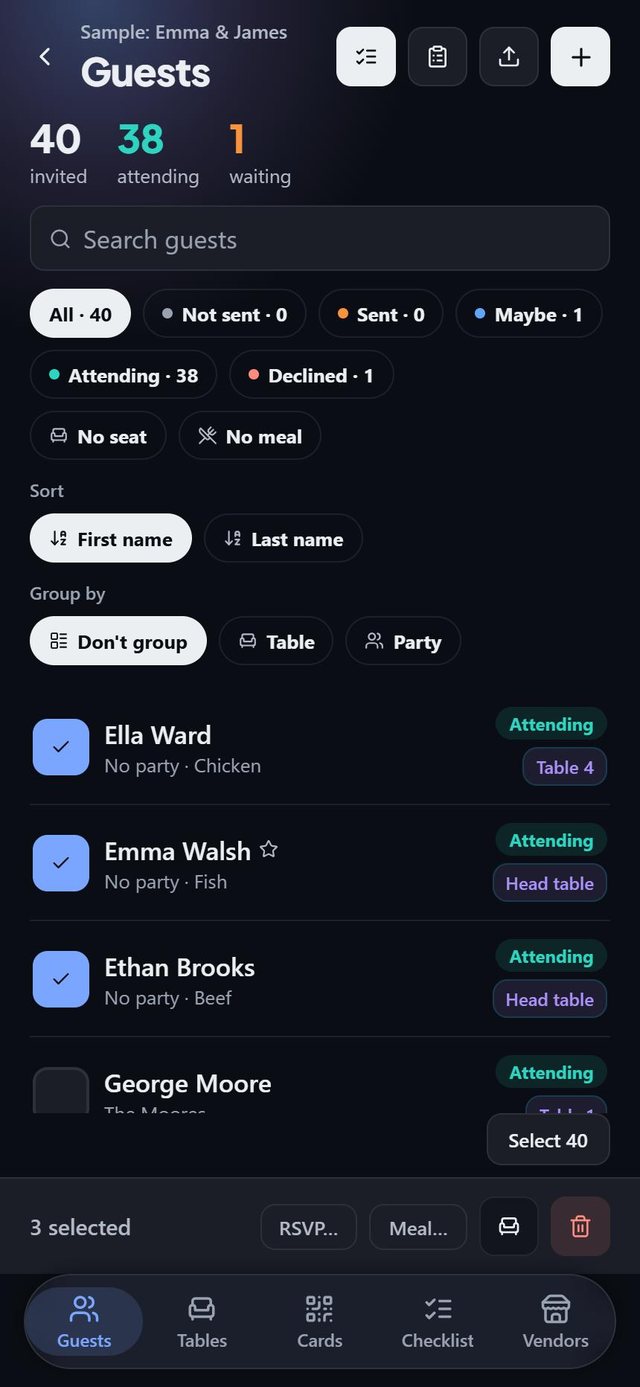
In SeatSpot's guest list, turn on selection, tick people and change their RSVP, meal or table together, or remove them. A hundred people get an answer in a few taps instead of a hundred.
- Where in the app
- Guests tab, selection mode
- Plan
- Free plan
- Account
- None needed
- Updated
How it works
- Use the filter chips, such as No seat or No meal, to narrow the list.
- Turn on selection and tap the button that says how many are on screen, for example Select 12.
- Pick an action from the bar at the bottom: RSVP, Meal, seat together or delete.
- Check the undo bar, which says how many guests actually changed.
Good to know
- Select only ever touches the guests you can see. Hidden guests keep what they had.
- Bulk meal fills blanks and never overwrites an existing answer.
- Bulk delete takes plus-ones with it, and the confirmation states the true number.
- Plan check rows for many guests open the list with those people already ticked.
- Swiping a guest on the list is a shortcut: right for Seat, left for Delete.
- Bulk editing is part of the free plan.
Common questions
Can I undo a bulk change?
Yes. The undo bar offers it for five seconds, and a restore point is saved before removing several guests.
Does a bulk meal change overwrite answers?
No. It fills gaps only. Corrections go through the guest's own card.
What happens to guests who decline?
Marking guests as Declined releases their seats.