
Meal choices for every guest
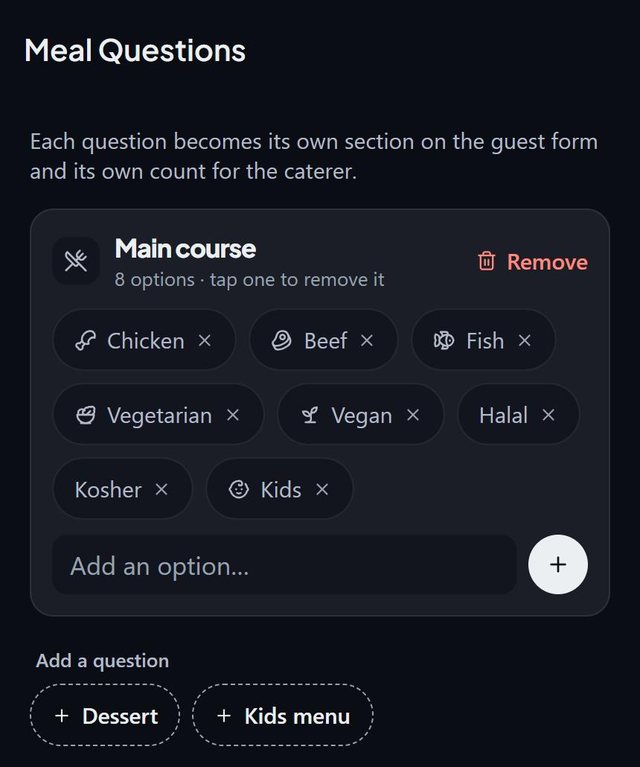
SeatSpot asks nothing about food until you switch a question on. Then each question, such as main course, dessert or kids menu, becomes its own section on the guest form and its own count for the caterer.
- Where in the app
- Guests tab, Guest report, Edit questions
- Plan
- Free plan
- Account
- None needed
- Updated
How it works
- Open Edit questions from the Guest report and switch on the questions your caterer asks.
- Edit the answers: tap an answer to remove it, or type a new one and press +.
- Pick one answer per question on each guest's screen, or answer for many guests at once from the guest list.
- See the totals in the Guest report and export the meal counts for the caterer.
Good to know
- Three questions are available: Main course, Dessert (Cake, Fruit, Ice cream, None) and Kids menu (Standard, Vegetarian, None).
- Switching a question off keeps the answers, so switching it back on restores everything guests told you.
- Bulk answers fill blanks and never overwrite: a guest who already chose keeps their choice.
- Only guests marked Attending are counted.
- Dietary needs are separate from meal questions, so a guest can be vegan and have a nut allergy.
- Meal questions and answers are part of the free plan. The meal counts PDF is part of Pro.
Common questions
Can I add my own dishes?
Yes. The default answers are a starting point. Type your own and press + on any question.
How do I enter meals for 200 guests quickly?
On the guest list turn on selection, tick the people, then choose Meal and an option. It fills blanks only, so earlier answers are safe.
What if I stop asking a question?
Switch it off. The answers are kept and ignored until you switch it on again.