
Dietary needs and allergy tracker
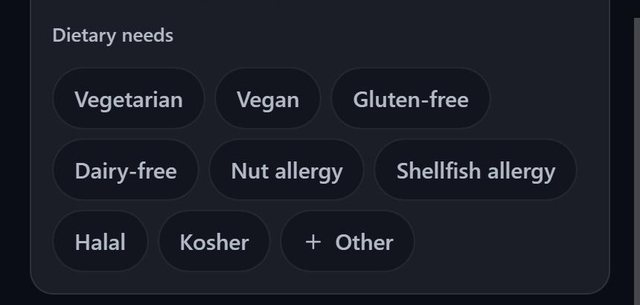
Every guest in SeatSpot can carry as many dietary needs as apply, from vegetarian and gluten-free to nut or shellfish allergies, halal and kosher. They feed the caterer sheet, where allergies print in bold, table by table.
- Where in the app
- Guest screen, Dietary needs
- Plan
- Free plan
- Account
- None needed
- Updated
How it works
- Open a guest and tick the needs under Dietary needs. You can tick as many as apply.
- For something not listed, tap Other, type it, for example Egg allergy, and press done. It is then offered on every guest in that event.
- Put how severe an allergy is in the guest's note, for example that they carry an EpiPen.
- Export the Meal counts sheet for the caterer.
Good to know
- Eight needs are listed: Vegetarian, Vegan, Gluten-free, Dairy-free, Nut allergy, Shellfish allergy, Halal and Kosher.
- Common spellings are tidied: GF becomes Gluten-free and nut-free becomes Nut allergy.
- A need you typed disappears from the list once no guest has it.
- Only guests marked Attending are listed, and attending guests without a seat appear under Unseated, so an allergy never falls off the sheet.
- In a spreadsheet, needs are one Dietary column separated by semicolons, and the importer also reads columns headed Diet or Allergies.
- Recording dietary needs is part of the free plan.
Common questions
Which allergies can I record?
Nut allergy and shellfish allergy are built in, and you can add your own, such as egg allergy, through Other.
Where do allergies show up for the caterer?
On the Meal counts sheet, listed table by table with seat numbers, with allergies in bold so they stand out from diets.
Can a guest have more than one need?
Yes. Tick as many as apply.