
Meal counts and caterer sheet
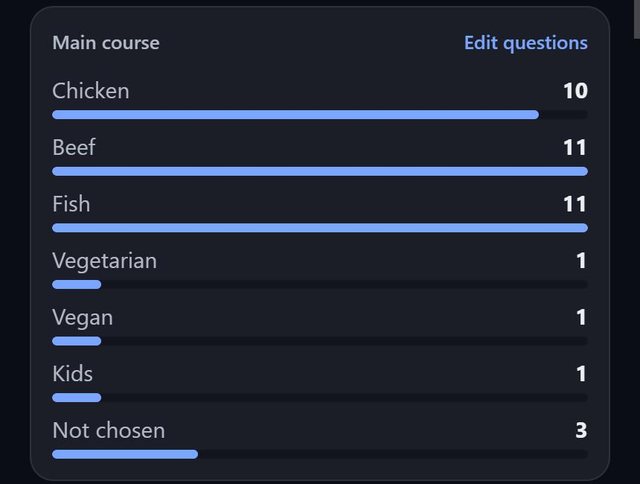
SeatSpot totals each meal question for your caterer, counting only guests marked Attending, and lists dietary needs table by table with seat numbers. Guests who have not chosen are counted separately, so the gap is visible.
- Where in the app
- Guests tab, Guest report, Export, Meal counts
- Plan
- Pro or event pass
- Account
- None needed
- Updated
How it works
- Make sure meal answers and dietary needs are filled in. The No meal filter on the guest list shows who is missing an answer.
- Open the Guest report and tap Meal counts under Export.
- Share or print the PDF for the kitchen.
- For the person carrying plates, use Seating by table as well, since it shows who at each table gets what.
Good to know
- Totals come first, then dietary needs table by table, each guest with their seat number. Allergies print in bold.
- Guests who are attending but not seated yet are listed under Unseated.
- Meal counts and Seating by table answer different questions: one is a shopping list, the other a serving order.
- Meal counts is part of Pro and the event pass.
Common questions
Does the sheet count guests who have not replied?
No. It counts only guests marked Attending, so the kitchen does not cook against a number that may not be real.
What about guests who have not chosen a meal?
They are counted separately as not chosen.
Is the caterer sheet free?
The caterer sheet is part of Pro and the event pass. Recording meals and allergies is free.