
PDF, spreadsheet and image exports
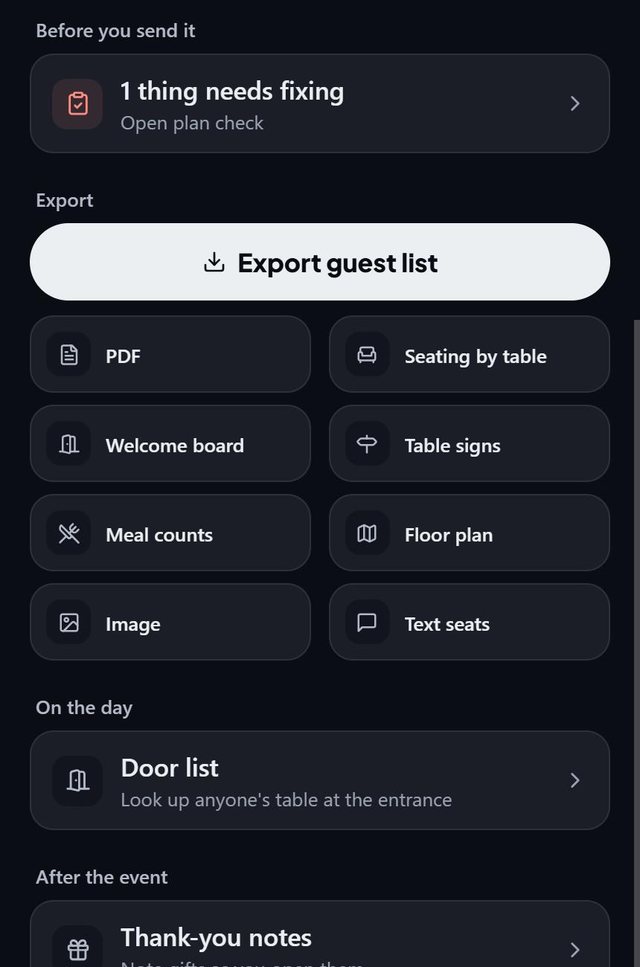
SeatSpot exports everything a venue, caterer or family might ask for: the guest list as CSV or PDF, seating by table, a welcome board, table signs, meal counts and the floor plan as a PDF or image.
- Where in the app
- Guests tab, Guest report, Export
- Plan
- Pro or event pass
- Account
- None needed
- Updated
How it works
- Open the Guest report from the Guests tab.
- Under Export, tap the CSV guest list for spreadsheets, or one of the tiles: PDF, Seating by table, Welcome board, Table signs, Meal counts, Floor plan or Image.
- Pick options where asked, such as a welcome board on Letter pages or as an 18 by 24 or 24 by 36 inch poster.
- Share, print or save the file.
Good to know
- Each export answers a question: the CSV is everything for a spreadsheet, Seating by table is who sits at table 4, the Welcome board is which table am I at, and the Floor plan is what the room looks like.
- The CSV round trip loses nothing: it carries every field the importer accepts, so you can export, edit and import back.
- The welcome board lists only seated guests and carries no RSVP or meal information, because it hangs in public.
- Documents that travel to the venue, the caterer and the family end with one small line, Made with SeatSpot. Place cards, table signs and the welcome board are not signed.
- Exports are part of Pro and the event pass.
Common questions
Which exports does SeatSpot have?
The guest list as CSV and PDF, seating by table, the welcome board, meal counts, the floor plan as PDF and image, table signs and QR escort cards.
Can I print a big welcome poster?
Yes. The welcome board can be a single 18 by 24 or 24 by 36 inch PDF, the sizes print shops mount on foam board.
Are exports free?
Exports are part of Pro and the event pass. The free plan lets you plan everything and leads to the upgrade screen when you export.