
RSVP tracker for weddings and events
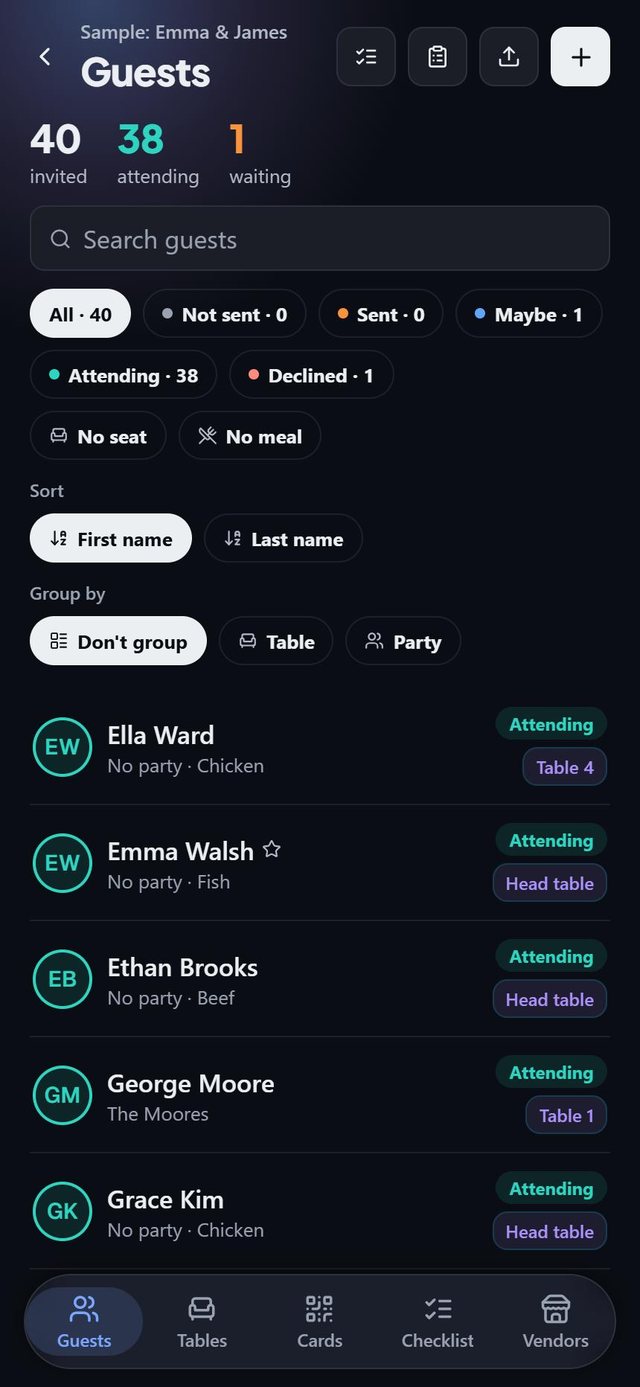
SeatSpot tracks RSVPs with five statuses that follow how an invitation really moves: Not sent, Sent, Maybe, Attending and Declined. Filter and group the guest list by any of them to see who still owes you an answer.
- Where in the app
- Guests tab
- Plan
- Free plan
- Account
- None needed
- Updated
How it works
- Add guests. Each one starts as Not sent.
- As invitations go out and answers come in, set the status on the guest, or select many guests and change them together.
- Use the filter chips and the search to narrow the list. Sort by first or last name and group by table or party.
- Open the Guest report for a ring showing where every invitation stands.
Good to know
- Not sent versus Sent separates forty invitations still to write from twelve people who owe you an answer.
- Maybe holds a seat and counts toward the places the room needs, but is left out of the meal counts and of Smart fill.
- Declining releases the seat automatically, so nobody who declined can be holding a chair.
- Importing a spreadsheet, a cell reading maybe, tentative or unsure lands as Maybe.
- Search ignores accents both ways, so Garcia finds García.
- RSVP tracking is part of the free plan.
Common questions
What RSVP statuses does SeatSpot have?
Not sent, Sent, Maybe, Attending and Declined.
What happens to a guest's seat when they decline?
Their seat assignment is deleted straight away, whether you change one guest or many.
Do guests answer inside the app?
No. SeatSpot is a private planner with no guest accounts. You record each answer yourself.