
Guest report: RSVPs and seating at a glance
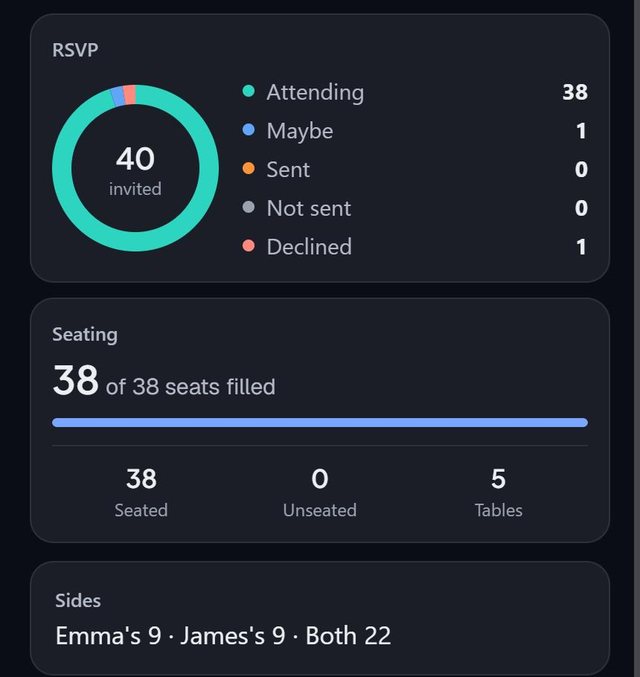
SeatSpot's Guest report opens with a summary: a ring showing where every invitation stands, the seats filled out of the room's total with what is still unseated, and a bar per option for each meal question.
- Where in the app
- Guests tab, Guest report
- Plan
- Free plan
- Account
- None needed
- Updated
How it works
- Open the Guest report from the Guests tab.
- Read the ring: Attending, Maybe, Sent, Not sent and Declined.
- Check seats filled and unseated, and the meal bars.
- Look at Before you send it to see whether plan check has anything blocking, one tap from the full list.
Good to know
- Three numbers head the guest list: invited, attending and waiting, which is everyone you have not heard from yet.
- Seated is counted against everyone who needs a seat, which is everyone except the declined.
- On a wedding, the report also shows the split by side.
- The same report holds the exports, Text seats, Door list and thank-you notes.
- The summary is part of the free plan.
Common questions
What does waiting mean?
Everyone you have not heard a yes or a no from, whether or not the invitation has gone out.
Where can I see how many are seated?
On the Guest report, on the strip at the top of the Tables tab and on the event's card on the home screen.
Does it include meal counts?
Yes, as a bar per option for each meal question.