
A checklist for the event
SeatSpot's Checklist is a to-do list scoped to one event. Tasks can have a deadline, a colour tag and a link to a guest, and a progress ring at the top shows how many are done, overdue or due soon.
- Where in the app
- Checklist tab
- Plan
- Free plan
- Account
- None needed
- Updated
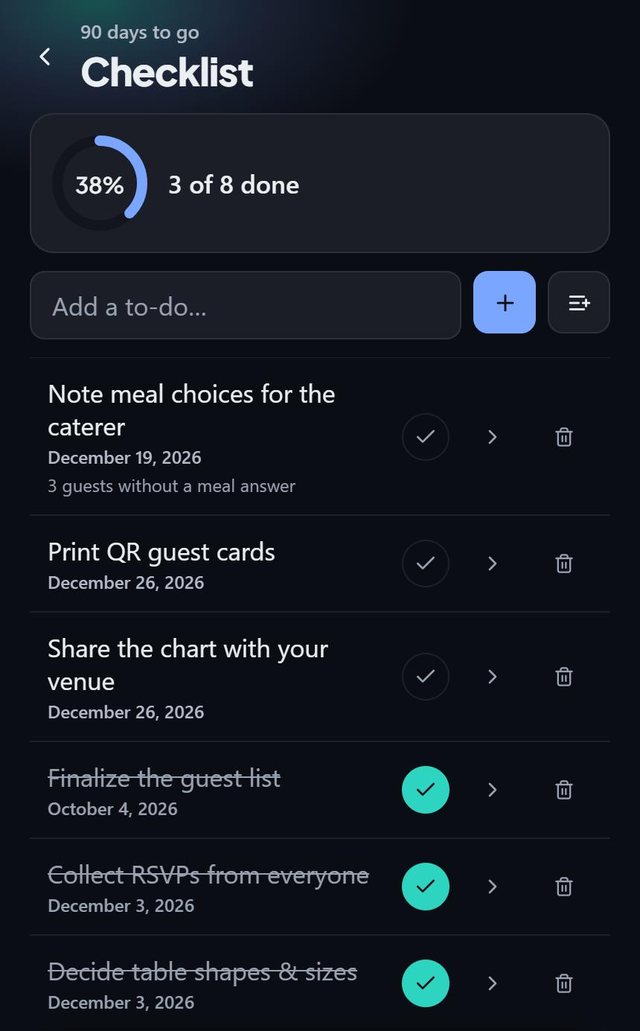
How it works
- Open the Checklist tab and add a task, or load a template.
- Set a deadline, pick a colour tag or link a guest, for example Call Anna about the dietary thing.
- Tap the round button to mark a task done. It asks first, so a stray tap ticks nothing.
- Watch the ring. It turns green when everything is done.
Good to know
- Overdue shows in red, today and tomorrow in gold, later dates plain.
- Three tasks show a live count: invitations still to send, guests without a meal answer and families split across tables.
- Nothing ticks itself. The count informs you and ticking stays yours.
- Swipe right for Done and left for Delete.
- A Local partners row at the bottom lets you search sponsored local businesses by ZIP code. Nothing about your event is sent.
- The checklist is part of the free plan.
Common questions
Can I link a task to a guest?
Yes, and you can open the guest straight from the task.
Do deadlines move if I change the event date?
No. Deadlines you already have stay as they are, so the app never rewrites dates you may have set.
Is there a checklist for every event type?
There are templates for weddings, celebrations, business events and wakes. Other has none.