
Ready-made checklist templates
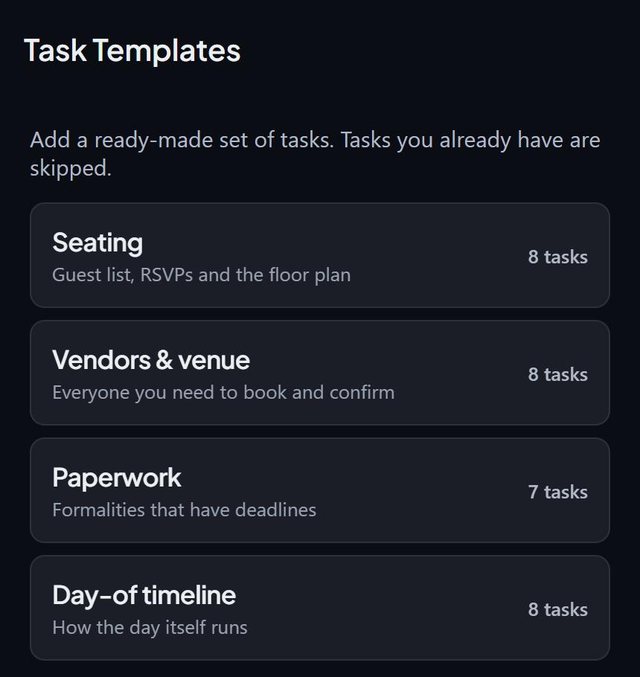
SeatSpot can load a ready-made checklist for your event type. Tasks arrive already dated, counted back from the event date, and tasks you already have are skipped.
- Where in the app
- Checklist tab, templates
- Plan
- Free plan
- Account
- None needed
- Updated
How it works
- Open the Checklist tab and choose to load a template.
- Load the checklist for your event type. It covers seating, vendors and venue, paperwork and the day-of timeline.
- Review the dated tasks: Collect RSVPs is a month before the day, Print QR guest cards a week before and Tour and book the venue a year before.
- Change any task's date if your plan differs.
Good to know
- There are four families: Wedding, Celebration (birthday, child's birthday, baby shower, bachelor, bachelorette), Business (company event, official reception) and Wake.
- Every family shares a core: finalising the guest list, collecting replies, table shapes and the day-of timeline.
- If the event is sooner than the interval, the task is due today, not overdue.
- An event with no date gets no deadlines.
- Other gets no template, because guessing would be worse than offering nothing.
- Loading a template can be undone from the undo bar.
Common questions
What if my event is only three weeks away?
Tasks that should have started earlier are due today rather than overdue.
Are there templates for events other than weddings?
Yes: celebrations, business events and wakes.
Will templates duplicate my tasks?
No. Tasks you already have are skipped.