
Drag and drop seating chart
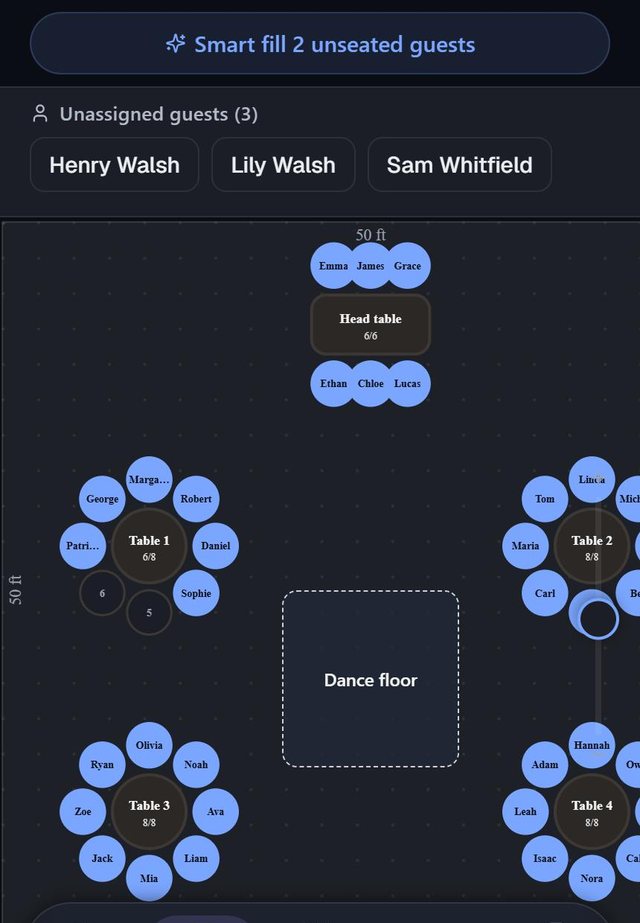
In SeatSpot you seat a guest by dragging their name onto a chair on the floor plan. The same drag moves someone who is already seated, and dropping onto an occupied chair swaps the two guests.
- Where in the app
- Tables tab
- Plan
- Free plan
- Account
- None needed
- Updated
How it works
- Unseated guests wait in a strip above the plan. Press a name and drag it onto a chair.
- While you drag, the name above your finger says where the guest would land, such as Table 3, seat 5.
- Release on an empty chair to seat the guest, or on an occupied chair to swap two seated guests.
- Prefer tapping? Tap any empty seat and pick someone from a list ordered by who suits that table.
Good to know
- Dragging an unseated guest onto an occupied chair does nothing and tells you the seat is taken, so nobody is turned out of a chair without being asked.
- Your phone gives a light tap when you pick someone up and a short double buzz when they sit down.
- Locking a table stops it being nudged around the room, not the people sitting at it.
- A question appears first if a move would seat two guests together who asked to be apart, or take someone away from their family.
- Seated guests are ringed in their party colour, so a family reads as a group at a glance.
Common questions
How do I swap two guests?
Drag one seated guest onto the other's chair. The two swap places in one move.
Can I seat several guests at once?
Yes. Seat a group at a table in one step, or let Smart fill seat every confirmed guest who still has no chair. Bigger actions like these can be undone from the bar at the bottom.
What if I drop a guest in the wrong place?
Release too far from a chair and nothing happens. If they landed on the wrong chair, drag them again. Nothing is locked in.