
Paste your guest list and let SeatSpot sort it out
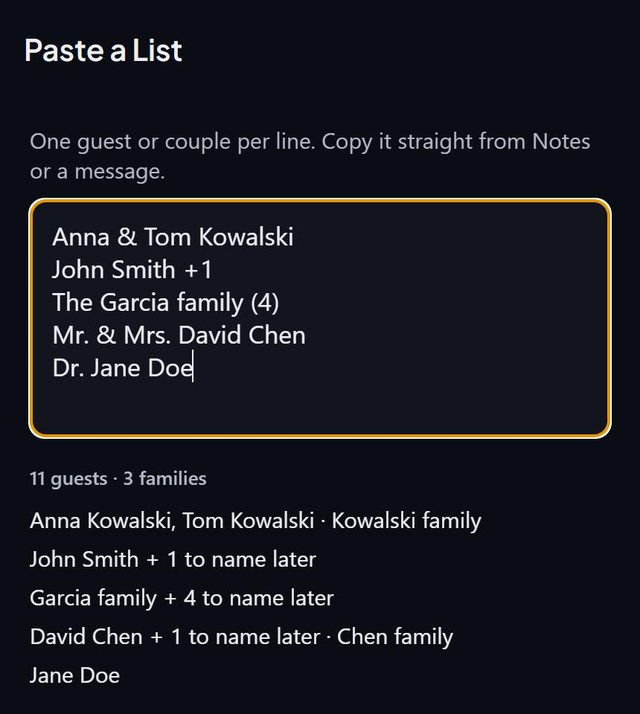
Paste a list of names into SeatSpot, one entry per line, and the app reads them the way people write them. Couples become two guests, a plus-one becomes a seat to name later and a family becomes held seats, all shown to you before anything is added.
- Where in the app
- Guests tab, Add guest, Paste a list of names
- Plan
- Free plan
- Account
- None needed
- Updated
How it works
- Copy your list from Notes, a message or an email, with one entry per line. Bullets and numbering are ignored.
- Open Paste a list of names under the add-guest form, or on the empty guest list, and paste.
- Check the preview. Each line shows how it was read, with a total such as 6 guests · 2 families.
- Confirm. Everyone arrives as Not sent, and anyone already on the list is skipped.
Good to know
- Anna & Tom Kowalski becomes two guests in the Kowalski family.
- John Smith +1 becomes John and a plus-one to name later.
- The Garcia family (4) becomes four held seats in the Garcia family.
- Titles such as Dr., Mr. and Ms. are dropped.
- On an iPhone you can scan a printed or handwritten list with the camera instead of typing.
- It is one undoable step, and on the free plan it is all or nothing against the 8-guest limit.
Common questions
What formats does Paste a list understand?
Plain lines of names. It reads Anna and Tom Kowalski, John Smith +1, Mr. & Mrs. John Smith and The Garcia family (4), and drops titles. For columns of data use the spreadsheet import instead.
Will it create duplicates?
No. Anyone already on your list is skipped, and you see the result before anything is added.
Can I paste from a spreadsheet?
Yes, but a spreadsheet with columns is better imported with the spreadsheet import, which matches the columns. If you paste a single column there, it offers to switch to Paste a list.