
Room templates: banquet, long tables, cocktail, conference
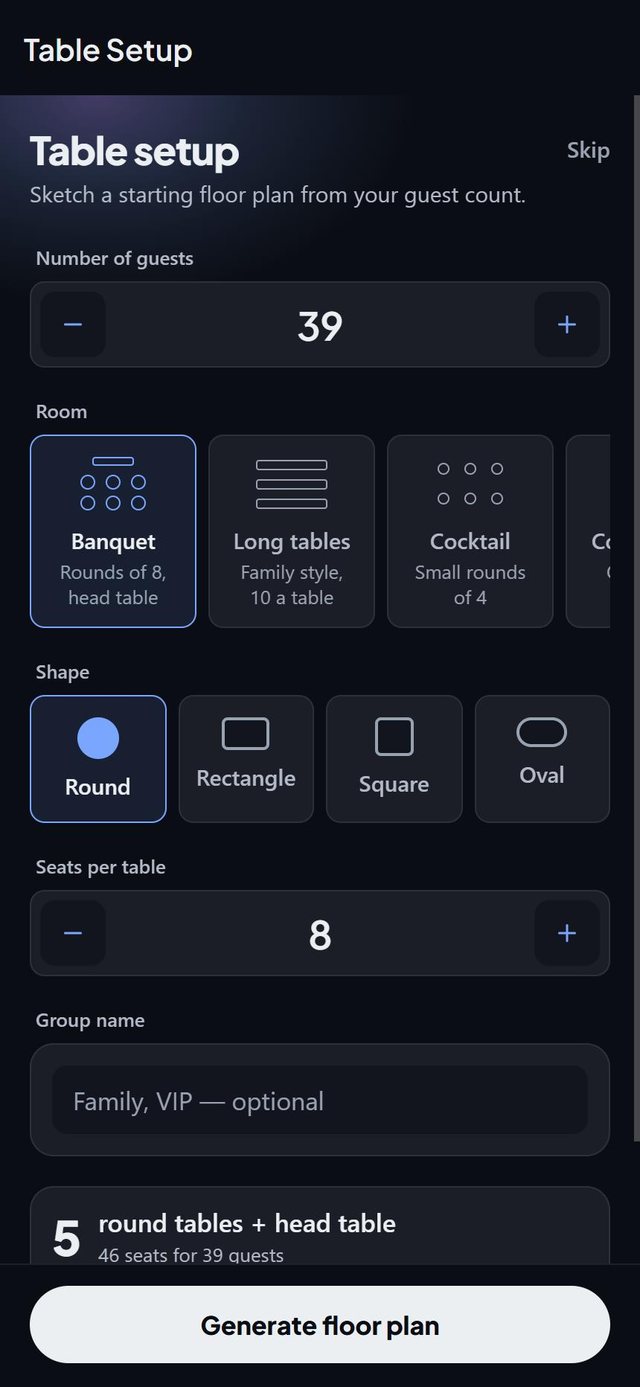
SeatSpot's Table setup builds your tables from a room template and your guest count. Choose Banquet, Long tables, Cocktail or Conference, and the app creates the right tables and shows the result before you generate.
- Where in the app
- Tables tab, Table setup
- Plan
- Free plan
- Account
- None needed
- Updated
How it works
- Open Table setup on the Tables tab. It also offers itself once, right after you create an event.
- Pick a template: Banquet, Long tables, Cocktail, Conference or Custom.
- Set how many guests you expect and the seats per table. The card above the button shows the tables and seats you will get.
- Tap generate. If the room is too shallow, SeatSpot enlarges its depth and tells you first.
Good to know
- Banquet builds round tables of 8 plus a head table of 6 across the front. Long tables builds family-style rectangles of 10. Cocktail builds small rounds of 4. Conference builds ovals of 8.
- A wedding starts on Banquet. Other events start on Custom with their usual shape.
- The guest count starts from your list, leaving out guests who declined.
- With a head table, its seats are taken off the count before the round tables are worked out.
- Generated tables can be undone from the undo bar.
- The free plan allows one table, and the result card warns you if your plan needs more.
Common questions
Can I skip the wizard and add tables by hand?
Yes. An empty floor plan offers both ways in, and you can come back to Table setup at any time.
What if I do not know my guest count yet?
Pick a rough number, or add a headcount first. You can change it at any time.
Does it change my room size?
Only if the tables will not fit. It enlarges the depth, never the width, and tells you the new size before you generate.