Seating for baby showers and birthday parties
A baby shower or a birthday party rarely needs a formal seating chart, but it still helps to know how many tables to rent, where the gift table goes and who has a toddler on their lap. SeatSpot handles that on your phone, starting from a rough headcount.
Start with a number, add names later
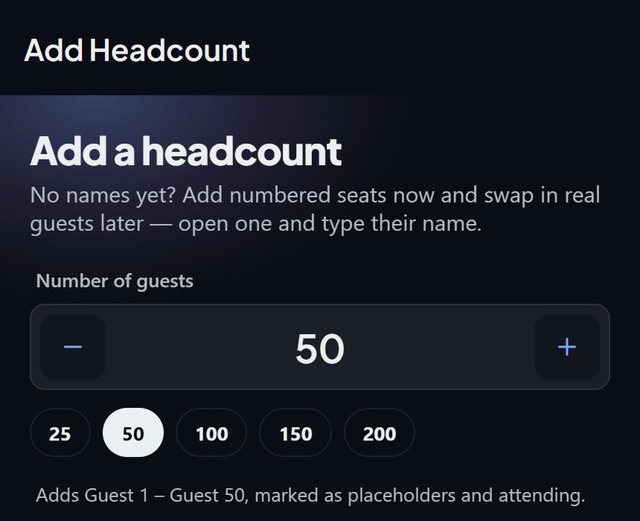
Shower invitations often go out before anyone knows who will bring a partner or kids. On an empty guest list, tap Start with a headcount, set the number (or tap 25, 50 or 100) and SeatSpot adds numbered seats: Guest 1, Guest 2 and on. They count in the plan and fill tables like named guests, so you can work out the room straight away. When a name arrives, open that seat, type it, and switch off A placeholder until you have their name.
If the list starts in a group text, Paste a list of names reads The Garcia family (4) as four held seats in the Garcia family.
Kids, infants and a kids menu
Showers and children's birthdays have more small guests than most events. Two tags help:
- Child marks the kids. On the floor plan, tap the Child filter and every child's seat is ringed, which answers "which table are the children at".
- Has infant marks a guest who comes with a baby. With an Entrance and a Dance floor drawn on the plan, Smart fill prefers a table near the entrance for them and away from the dance floor.
Switch on the Kids menu meal question (Standard, Vegetarian, None) if the caterer asks, and tick dietary needs such as Nut allergy per guest. The Meal counts sheet prints allergies in bold.
A small room with a gift table
A shower is usually a few tables. The Cocktail template in Table setup builds small rounds of 4; Custom lets you choose round tables of 8 or one long rectangle instead. Then tap Area for the gift table, the cake table and the buffet, and drag them where they will stand. For sizing, see how many guests fit at a round table.
Baby showers, birthdays and children's birthdays share the Celebration checklist template, and Smart fill keeps each family together at these events.
Gifts and thank-you notes
At a shower, the gifts are a large part of the afternoon. Every guest's screen has a Gift section for what they gave, in your own words, and a Thank-you sent switch. The Guest report shows Thank-you notes with three tabs: To write, Sent and No gift noted. If the event has a date, a reminder the day after asks you to write gifts down while you remember them.
Questions people ask
Is SeatSpot free for a small baby shower?
The free plan holds one event with one table and eight guests, with the floor plan, guest list, gifts and checklist included. Printing and exports need an event pass, $19.99 once for that event, which also removes the table and guest limits.
Can I plan a child's birthday party with it?
Yes. Child's birthday and birthday are both event types, and both use the Celebration checklist template.
Do numbered seats show up on printed cards?
No. Seats from a headcount get no guest card and do not appear on the welcome board until they have a name.
Do I need internet at the venue?
No. Everything in SeatSpot works offline, and the plan is stored on your phone.