
How to print place cards at home
To print place cards at home, use 65 to 80 lb cover stock, feed it through the rear tray if your printer has one, set the paper type to card stock, and print one test sheet before the full run. A home printer handles this well; what usually goes wrong is the weight of the card and running out of sheets.
Below are the sheet counts for 40 to 250 guests, which card to buy, the printer settings, and how to cut and fold without a crease that cracks.
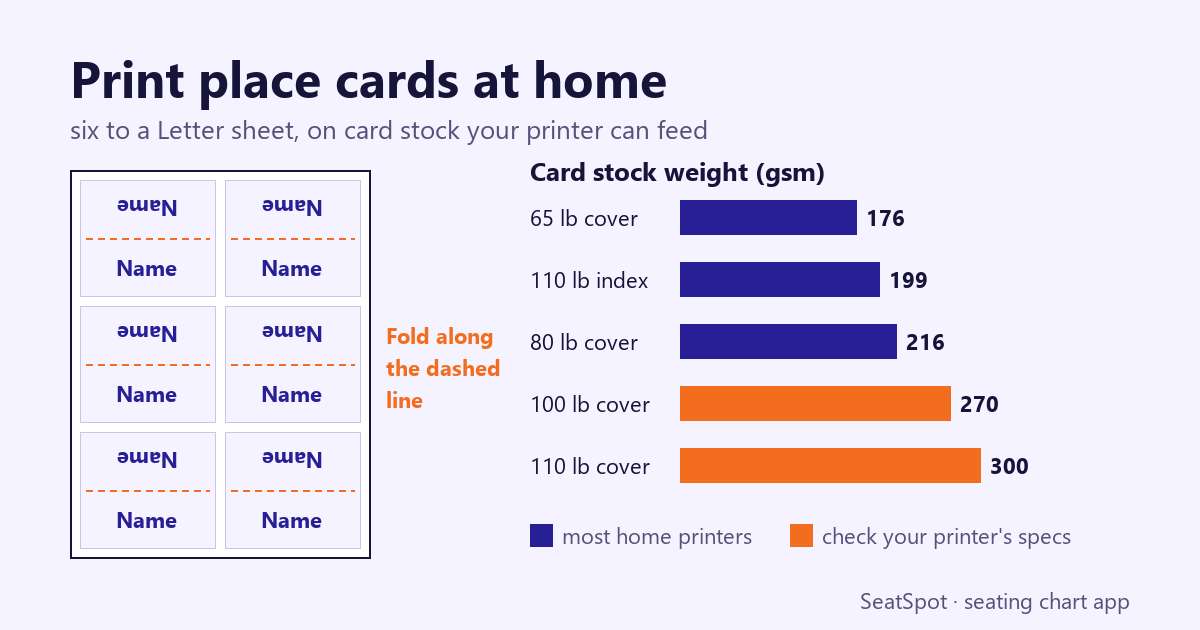
How many place cards fit on one sheet?
It depends on the card. Avery's pre-cut tent cards (item 5302) finish at 2 by 3.5 inches and come four to a sheet, 160 to a pack, and the size matches the 3.5 by 2 inch tent card Paperlust calls standard. If you cut your own from plain Letter stock, a two-by-three layout gives six to a sheet.
Print more than your guest count. A name gets misspelled, someone adds a plus-one, a card creases on the way to the venue. Paperlust's table adds 5 cards under 50 guests, 8 to 10 for 50 to 100, 10 to 15 for 100 to 200, and 15 to 20 above that. We took the top of each range, and worked out the sheets:
| Guests | Spare cards | Cards to print | Sheets at 4 per sheet | Sheets at 6 per sheet |
|---|---|---|---|---|
| 40 | 5 | 45 | 12 | 8 |
| 75 | 10 | 85 | 22 | 15 |
| 100 | 10 | 110 | 28 | 19 |
| 150 | 15 | 165 | 42 | 28 |
| 250 | 20 | 270 | 68 | 45 |
Each sheet count is rounded up, and it does not include test prints, so buy a few more. One 160-card Avery pack is 40 sheets, which covers you up to 100 guests in this table. At 150 guests, the 165 cards are just over one pack, so you need two.
What paper should you use for place cards?
Use card stock labeled for your kind of printer, in a matte, uncoated finish if you have an inkjet. Glossy stock made for lasers does not absorb inkjet ink and can smear, and some inkjet-coated stock can smudge in a laser printer's fuser.
Weight is where labels mislead, because "cover" and "index" run on different scales. Compare the gsm figure instead. This is Castle Ink's guide to what home printers take:
| Label | About (gsm) | Home printer fit |
|---|---|---|
| 65 lb cover | 176 | Most inkjets and lasers |
| 110 lb index | 199 | Most inkjets, many lasers |
| 80 lb cover | 216 | Many inkjets, rear tray; check laser specs |
| 100 lb cover | 270 | Rear or manual feed, some models only |
| 110 lb cover and up | 300+ | Usually too thick |
Paperlust suggests 80 to 100 lb stock for homemade cards, so the top of that range is worth buying only if your printer's spec sheet allows it. Avery's tent cards are 65 lb, 176 gsm, which is the safe end of the table.
How do you print tent cards on a home printer?
These settings come from Castle Ink and Avery, and they work whichever card you pick:
- Print one sheet on plain paper. Check names, the layout and which way up the sheet feeds. Mark an arrow on the test sheet if you are not sure which side prints.
- Set the printer. Choose Cardstock or Heavy as the paper type, Letter as the size, High or Best as the quality, and turn two-sided printing off. On a laser, the Heavy setting runs the fuser hotter for thick card.
- Feed from the rear tray or manual slot. The path is straighter there, so the card bends less. Load 5 to 10 sheets, or one at a time for very thick stock. Avery advises one at a time for its tent cards.
- Print one sheet on the real card. Then run the rest.
- Let inkjet sheets dry. Give them a few minutes before stacking, and longer with heavy color.
How do you cut and fold place cards neatly?
If you are not using pre-cut sheets, a paper trimmer gives straighter edges than scissors. It matters more than you would think, because a standing card shows all four edges at the table.
Score each card before you fold it. Mankey Monkey warns that fibers in thick card can crack on a sharp bend, so run a blunt edge along a ruler on the fold line first, then fold along it. Try it on a spare card first to see how your stock behaves.
Timing matters too. Print last, after your final headcount has gone in and the seats are settled. Our seating chart timeline has the dates to work back from.
Doing this in SeatSpot
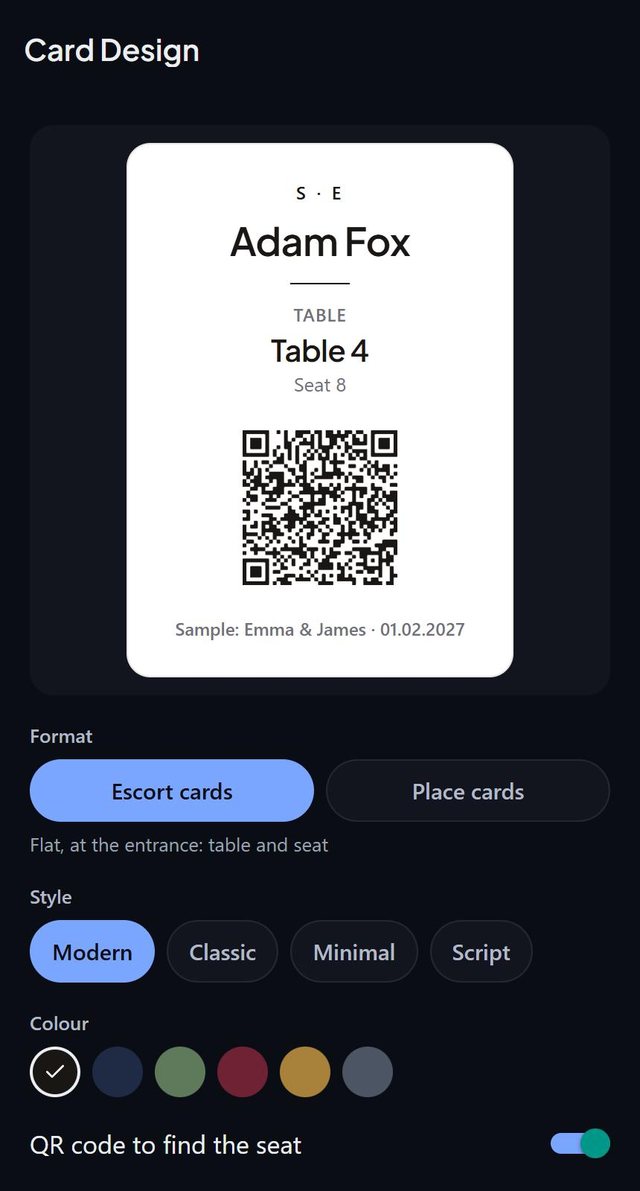
SeatSpot lays out the cards from your seating plan, so you are not retyping names into a template.
- Seat your guests. A card exists only for a guest with a seat. The Cards tab says how many are ready, and how many guests who are coming still have no seat.
- Pick the format. Tap change design and choose Place cards. They fold in half and print six to a page, with the name on both halves and the top one upside down, so the folded card reads from both sides. See card design.
- Choose the look. Pick Modern, Classic, Minimal or Script, and one of six inks. The welcome board and table signs follow the same style.
- Decide about the meal. Turn on Main course under the name if you want each guest's main course in small capitals for whoever serves.
- Print and fold. Print on card stock, cut the cards apart and fold along the dashed line. The six-to-a-page layout is for plain sheets, not pre-cut four-to-a-sheet stock.
Exports are part of Pro or the one-event pass. SeatSpot is available on Google Play and the App Store.
Questions people ask
Can you print tent cards on a home printer?
Yes. Avery's 65 lb tent cards are sold for both laser and inkjet printers. Use the card paper setting and feed one sheet at a time.
What weight of card stock works in a home printer?
Most home inkjets take 65 to 80 lb cover, about 176 to 216 gsm. Heavier stock needs the rear tray or manual slot, and only some models take it, so check your printer's spec sheet first.
How many extra place cards should I print?
Paperlust's table adds 5 spare cards under 50 guests and up to 20 for more than 200. We use 10 for 100 guests.
Should the meal choice go on the place card?
Only if your caterer asks. Paperlust advises a small symbol or colored dot instead of the full dish name on a visible card, and says to confirm the system with the caterer.
Do tent cards need holders?
No. Paperlust lists tent cards as needing no holder, holders as optional for flat cards and recommended for die-cut or round ones.
Created by Mariusz Bednarczyk and fact-checked against the sources above. He reads each post after publication. How we make posts: About the blog.
Plan it next
Related guides
- Escort cards vs place cards: which do you need?
- What size should a seating chart sign be?
- How to give your caterer entree counts by table
Start here: How to make a wedding seating chart, step by step
More in Printing and place cards