A wedding seating chart maker that lives on your phone
SeatSpot is a wedding seating chart maker for iPhone and Android. You build the guest list, lay out the reception room to scale and seat people by dragging their names onto chairs. There is no account to create, and the plan stays on your phone.
Two families on one list
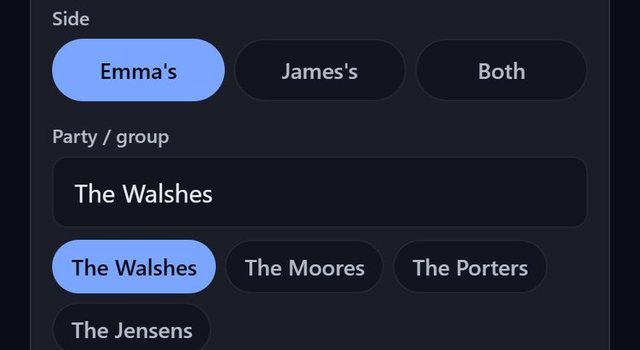
A wedding guest list usually comes from two households, and many couples keep an eye on how the invitations split between them. When the event type is Wedding, each guest's screen asks whose side they are from, using the names in the event title: Emma & James gives Emma's, James's and Both. The Guest report shows the split and how many guests have no side yet.
Families go into a party. When you run Smart fill at a wedding, it keeps each party together, largest group first, at the smallest table that fits them all. If a family ends up across two tables, plan check names it, and you can tick Sitting apart is intentional when that was the plan.
The room: round tables, a head table, a dance floor
Table setup opens on the Banquet template for a wedding: round tables of 8 plus a head table of 6 across the front. You give it your guest count and it builds the tables, enlarging the room's depth if they would not fit. If you prefer one long table for the wedding party, the U-Shape is there for a head table.
Then tap Area and add the dance floor, the cake table, the gift table and the bar. A wedding lists those first. Areas print on the floor-plan PDF, so whoever sets up the room can see where tables do not go, and plan check lists any table standing on one. For questions about spacing, see how many guests fit at a round table.
People who should not share a table
Most weddings have at least one pair who are better apart. Open a guest, add the other person under do-not-seat-with, and the rule is stored on both of them. A table with a conflict is flagged on the floor plan, seating a group onto that table warns you first, and Smart fill avoids it where it can. When it cannot, the bar at the bottom says so, for example 2 despite conflicts. Seating divorced parents is a common case; this guide covers how couples usually handle it.
What you print for the day
The Cards tab makes escort cards, four to a page, with the guest's name, table and seat printed in ink and a QR code that opens a small map of the room. Card Design switches them to place cards that fold and stand at the plate, with the main course under the name if you like. From the Guest report you also get:
| Export | For |
|---|---|
| Welcome board | the sign by the door, as Letter pages or a poster of 18 × 24 in or 24 × 36 in |
| Seating by table | the venue staff, with notes and tags under each name |
| Meal counts | the caterer, counting only guests marked Attending |
| Table signs | one folded sign per table |
The welcome board and the escort cards never show tags such as Child or Accessible, because your guests read them.
Questions people ask
Is the wedding seating chart app free?
The free plan holds one event with one table and eight guests. A wedding usually needs more, so most couples buy an event pass: $19.99 once for that event, with no limit on tables or guests and all eight exports included.
Can I try it before I enter my own guests?
Yes. See a sample event opens a finished wedding with forty guests, five tables, a dance floor, meal choices and a started checklist. You can move and edit everything in it; only exports and texting seats are off.
Does my guest list go to a server?
No. The plan lives on the phone and the app works offline. The only thing that ever leaves the phone is a ZIP code and a trade, when you search for a vendor on the Partners near your event screen. Make a backup file so the plan exists somewhere else too.
Can guests get their table by text?
Yes. Text seats on the Guest report lists every seated, attending guest with a phone number and opens your Messages app with their table and seat filled in. You press Send yourself for each one.