
How to choose a seating chart app: an honest guide
The best seating chart app is the one that fits how you plan: which device you will use, whether your guests answer RSVPs online, how many guests you have, and what you need to print at the end. Before you compare features, decide four things: phone or desktop, account or no account, one-time price or subscription, and which printouts your venue and caterer want.
This blog is published by the maker of SeatSpot, one of the apps compared below. We have tried to be fair: every fact about another product comes from that product's own page or app-store listing, linked in the sources, and where a page does not say something, the table says "not stated" rather than guessing.
What should you look for in a seating chart app?
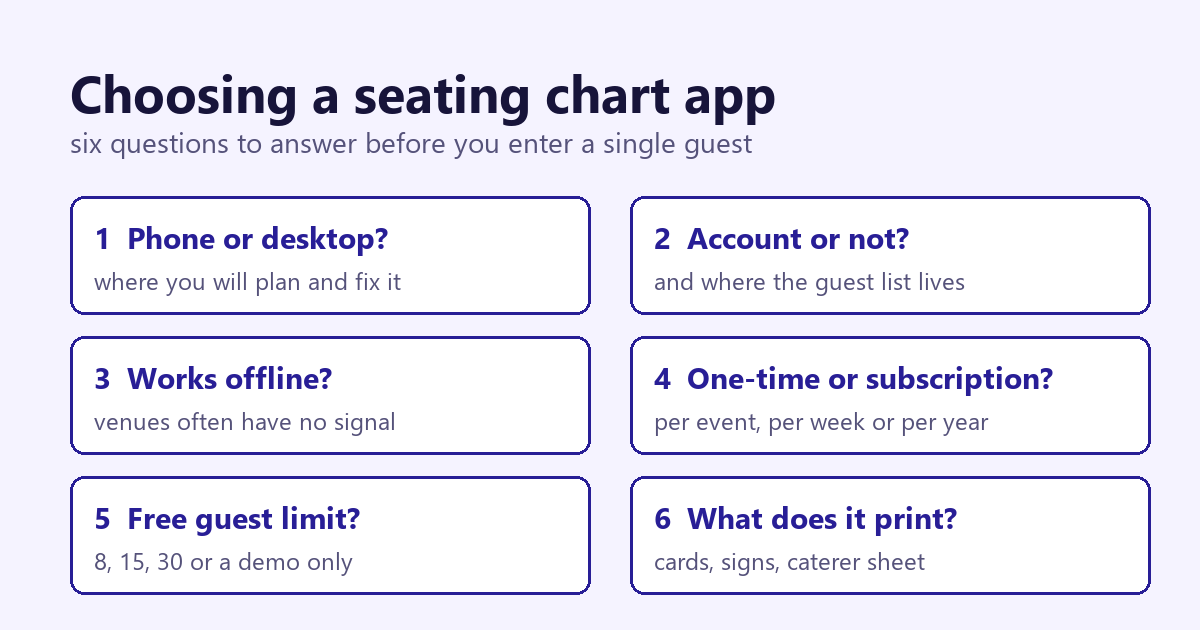
Use this as a checklist. Each point is a question to answer before you pay for anything.
- Phone or desktop. Do you want to seat guests on the couch with your phone, or at a desk on a big screen? Some tools are web-first with an app on the side, some are phone apps, and some are desktop programs.
- Account and where your data lives. A cloud account lets several people edit and keeps the plan if you lose your phone. A tool with no account keeps your guest list on your device, which is more private but means you are responsible for backups.
- Offline use. Venues often have poor reception. If you want to check the plan in a basement ballroom, make sure the app works without a connection.
- Price model. There are three common models: a one-time price (per event or for the program), a subscription (weekly, monthly or yearly), and "free" tools that come with a wedding website and registry. A subscription you forget to cancel can cost more than a one-time unlock, so check how long you will need it.
- Guest limits on the free tier. Many tools are free up to a small number of guests. Find out the number before you type in 150 names.
- Printing and exports. List what you will hand over: a PDF of the floor plan for the venue, meal counts for the caterer, escort cards or place cards, a welcome sign, a spreadsheet. Check the formats, not just the word "export".
- Conflicts and rules. Some apps let you record who should not sit together and warn you when the plan breaks that rule. With divorced parents or family tension, this matters more than any visual feature.
- Floor plan to scale. A grid of numbered circles is enough for some events. If your room is tight, you want a plan drawn in feet so you can see whether ten tables and a dance floor really fit.
- RSVP and meals. Decide whether guests will answer through a website you send them, or whether you will collect answers yourself and record them. Then check that the tool counts meals and dietary needs per table.
How do popular seating chart apps compare?
Prices checked on 14 November 2026. "Not stated" means the product's own page or listing that we opened did not say.
| Tool | Platforms | Account | Price | Free tier | Exports |
|---|---|---|---|---|---|
| SeatSpot | iPhone, iPad, Android | No account; data stays on the phone | Event pass $19.99 once per event, or Pro $9.99/month or $59.99/year | 1 event, 1 table, 8 guests | PDF, CSV, PNG image (with a pass or Pro) |
| Zola seating chart | Zola iOS app and desktop; Android not stated | Uses your Zola guest list | Seating Chart in-app purchase $14.99 (App Store) | Up to 15 guests | PDF, Excel |
| Joy seating chart | Web; Joy has a mobile app, seating on it not stated | Starts from your Joy event dashboard | One-time purchase per event; amount not stated | Sample floor plan to explore first; Joy website, RSVP and guest list are free | CSV (meal counts, table assignments), PDF floor plan |
| Seat Puzzle | iPhone, iPad, Mac, Android, web | Seat Puzzle account syncs across devices | Subscriptions on the App Store, e.g. $5.99/week, $19.99/month, $69.99 or $129.99/year; All Access $139.99 | Free demo; limits not stated | PDF, photo, CSV |
| PerfectTablePlan | Windows, Mac | Licence key; account not stated | One-time: Home $29.95, Advanced $74.95, Professional $299.95 | Trial cannot save, export or print plans over 30 guests | Printing listed; file formats not stated |
| Prismm (formerly AllSeated) | Cloud-based, with a web login; apps not stated | Account | Not stated on the pages we could open | Not stated | Not stated |
A few details from those pages are worth adding. Zola pulls confirmed guests from its guest list, lets you tag guests by group and diet, and supports separate floor plans for the ceremony, rehearsal dinner and reception. Joy also builds the chart from its guest list, so a guest who RSVPs yes appears ready to seat with their plus-one. Seat Puzzle's App Store listing says the app works offline and syncs through an account, and its site offers online RSVP forms. PerfectTablePlan says one licence covers up to five of your own computers and the payment is not a subscription. Prismm describes floor plans drawn to scale, 3D views of the venue, and real-time collaboration with couples and planners.
Is a free seating chart app enough?
For a small event, often yes. Zola is free up to 15 guests, and SeatSpot is free for one event with one table and eight guests, which suits a dinner party or a test run. Joy's wedding website, RSVP and guest list cost nothing, but its own help article calls the seating chart a one-time purchase per event.
For a wedding of 100 or more, plan on paying something. The real comparison is the total for the months you will use it: a one-time unlock against a subscription multiplied by your planning time. Write that number down for each tool you shortlist.
Who should choose which tool?
Choose a wedding website platform (Zola or Joy) if you want guests to RSVP online and the answers to flow straight into the chart. That is their main strength, and none of the phone-only approaches replace a guest-facing RSVP site.
Choose a desktop program (PerfectTablePlan) if you like working on a large screen, want a one-time price, and plan big or repeated events. Check the edition you need: custom guest fields and multi-plan reports differ between Home, Advanced and Professional.
Choose a cloud platform (Prismm or Seat Puzzle) if several people need to edit the same plan on different devices, or if you are a planner or venue working with clients. Prismm in particular is aimed at professionals and venues as well as couples, with 3D and collaboration.
Choose SeatSpot if you want to plan on your phone or iPad, prefer no account, want the plan to work offline, and want a one-time price for a single event. SeatSpot is not the right pick if you want a wedding website where guests fill in their own RSVP (in SeatSpot you record replies yourself), if two people need to edit the same plan at once from different devices, or if you run venue-scale events with sales teams and many rooms.
Doing this in SeatSpot
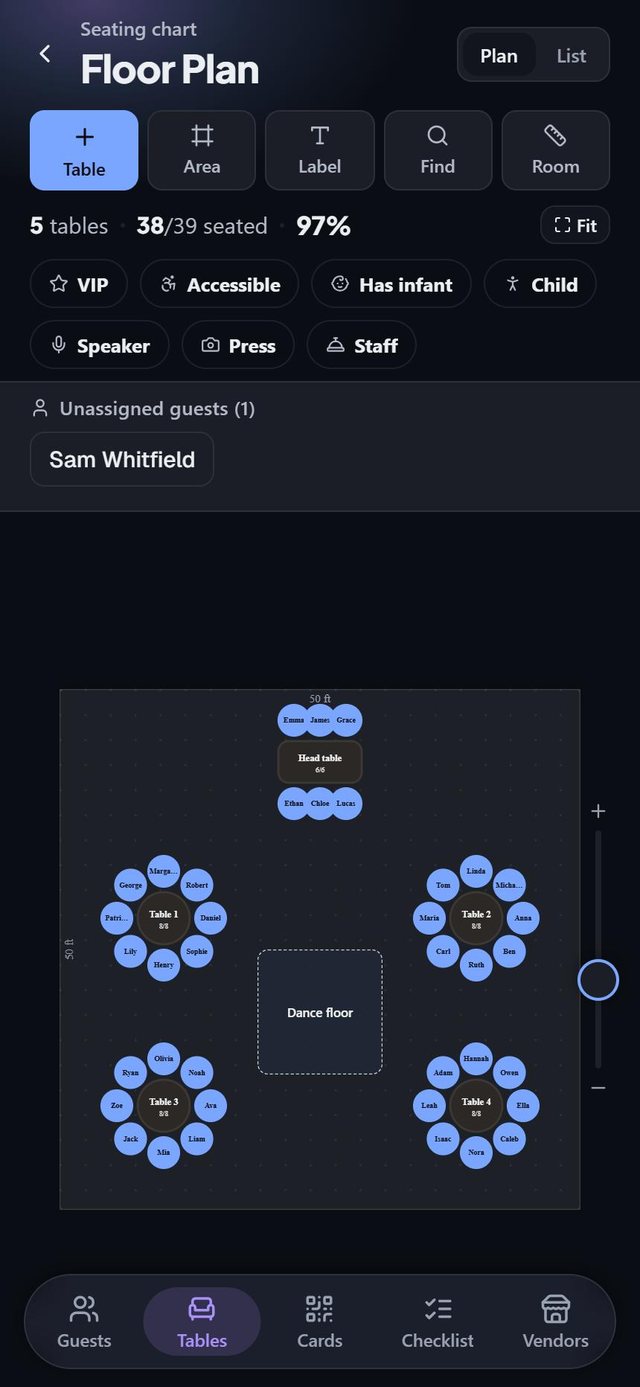
Since we make it, here is exactly what SeatSpot does, with nothing added. It is an app for iPhone, iPad and Android. There is no account; your plan lives on the phone and works without a connection, so make a backup before you have a lot to lose.
You draw the room to scale in feet or meters and drag guests onto seats. Smart fill seats every confirmed guest who has no chair yet, keeping parties together. Do-not-seat-with rules are stored on both guests; a table that breaks one is flagged, and Smart fill avoids it or tells you when it could not. Plan check lists what is still contradictory or unfinished. You record each guest's RSVP and meal and dietary answers, and the app counts them.
For the day itself there are escort cards with a QR code, place cards, a welcome board poster, a caterer sheet, and a door list for whoever greets guests. Exports are PDF, CSV and a PNG image of the floor plan. Some checklist tasks about hiring a vendor show sponsored listings from partner businesses who pay to appear there.
The free plan covers one event, one table and eight guests. An event pass is $19.99 once for one event; Pro is $9.99 a month or $59.99 a year for every event. See the floor plan, Smart fill and exports pages, and our step-by-step seating chart guide for the whole process. If you are deciding what to print, escort cards vs place cards explains the difference, and entree counts by table covers the caterer's side.
Questions people ask
Is there a free seating chart app?
Yes, with limits. On their own pages, Zola is free for up to 15 guests, SeatSpot is free for one event with one table and eight guests, and Seat Puzzle offers a free demo. PerfectTablePlan's trial is free but cannot save, export or print plans with more than 30 guests. For a full wedding, expect to pay.
What is the best seating chart app for iPhone?
It depends on how your guests RSVP. Zola, Seat Puzzle and SeatSpot all run on iPhone. If your RSVPs come through Zola, its chart already has your guests. If you want a cross-device account, Seat Puzzle syncs. If you want no account and offline use, SeatSpot keeps everything on the phone.
Is a one-time price better than a subscription?
For one wedding, usually. A single event lasts months, not years, and a one-time unlock cannot renew by surprise. A subscription makes more sense if you plan several events a year.
Can seating chart software print escort cards and meal counts?
Some can. Joy exports meal counts and table assignments as CSV, Zola downloads a PDF or Excel sheet, and SeatSpot prints escort cards, place cards and meal counts as PDF. Check the exact list against what your venue and caterer ask for.
Created by Mariusz Bednarczyk and fact-checked against the sources above. He reads each post after publication. How we make posts: About the blog.
Plan it next
Related guides
- How to make a wedding seating chart, step by step
- How to seat wedding guests who don't get along
- Alphabetical seating chart or by table? How to choose
Start here: How to make a wedding seating chart, step by step
More in Seating charts and etiquette
Sources
- Zola: seating chart tool page
- Zola: help article, how to use the seating chart (free up to 15 guests, PDF or Excel)
- Zola: App Store listing (Seating Chart in-app purchase, compatibility)
- Joy: seating chart page (CSV and PDF downloads, RSVP sync)
- Joy: help article, seating chart (one-time purchase per event, sample floor plan)
- Joy: pricing page (website, RSVP and guest list free)
- Seat Puzzle: home page (platforms, web version, RSVP forms, exports)
- Seat Puzzle: App Store listing "Wedding Seating Chart Planner" (in-app purchases, account sync, offline, exports)
- PerfectTablePlan: home page (Windows and Mac, one-time payment)
- PerfectTablePlan: purchase page (edition prices, trial limit of 30 guests)
- Prismm: wedding planning software page (to scale, 3D, real-time collaboration)